三种百分比问题:日常最常用的题型
三合一:计算某数的百分比、两数间的百分比关系,以及百分比变化。
X% × Y 是多少?
200 的 15%
30
增加 15% 后
230
减少 15% 后
170
X 占 Y 的百分之几?
45 是 180 的百分之几
25.00%
从 X 到 Y 的百分比变化
百分比变化
+25.00%
增长
如何使用本计算器
- 第一节 — 输入百分数与基数,求部分值及增减后的结果。
- 第二节 — 输入两个数,求前者占后者的百分比(如得分占满分)。
- 第三节 — 输入原值与新值,求百分比变化(如涨价、涨幅)。
Percentage calculator formulas, and when each one applies
Three questions get called “percentage” and each takes a different formula. Picking the wrong one is the most common way a percentage goes wrong in a spreadsheet, so it is worth knowing which of the three you are actually asking:
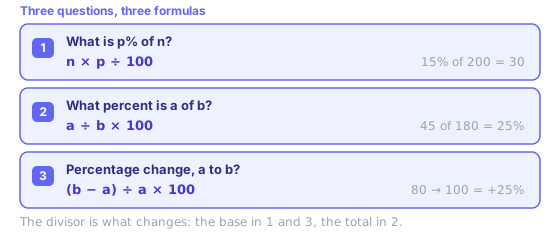
- Section 1 — taking a slice
- A tip, sales tax, a deposit, a commission, progress against a quota. You know the whole and you want part of it.
- Section 2 — comparing two numbers
- A test score, a conversion rate, one line item against a budget. You know both numbers and you want the ratio between them.
- Section 3 — measuring a move
- A price change, headcount, traffic month over month. Whichever value came first is always the divisor, which is what makes the answer directional.
One shortcut worth knowing: to find a percentage of a number, p% of n always equals n% of p. If 18% of 50 looks awkward, flip it — 50% of 18 is 9, and you did it in your head.
Reverse percentage: working back to the original number
This is the calculation people get wrong most often, because instinct says to subtract that same percentage again. You have to divide instead. If a price of £78 is what remains after a 30% increase, the original was 78 ÷ 1.30 = £60 — not 78 − 30%, which would give £54.60. Going the other way, if $90 is a price after 25% off, the original was 90 ÷ 0.75 = $120.
That asymmetry explains a result which looks like a bug. Take 100, add 10% to get 110, then take 10% off: you land on 99, not 100. Your increase was 10% of 100 and your decrease was 10% of 110, so a percentage increase or decrease of the same size is never the same amount. To undo a 10% rise you need a 9.09% cut. Stacked discounts behave this way too — 25% off then a further 20% off is 40% off in total, not 45%, because that second cut applies to an already reduced price.
To reverse anything with this percentage calculator, use section three: put your known figure in as the new value, try an original, and adjust until the percentage change matches what you were told. Or use the discount calculator, which reverses a sale price directly. If the same rate applies period after period rather than once, that is compounding, and the compound interest calculator is the right tool.
Percentage points are not percent change
When a rate moves from 20% to 25%, two different true statements describe it: it rose by 5 percentage points, and it rose by 25%. One is a plain gap between two percentages. The other is relative change, 5 ÷ 20 × 100, and that is what section three of this percentage calculator computes.
This matters whenever whatever is being measured is itself a percentage — interest rates, unemployment, market share, tax bands. “Approval climbed 25%” and “approval climbed 25 points” describe very different weeks. Comparing two percentages? Say points. Measuring growth? Say percent.
Percentage change in Excel and Google Sheets
Same formula, same in both. With the old value in A2 and the new value in B2, percentage change is =(B2-A2)/A2 with the cell formatted as Percentage, or =(B2-A2)/A2*100 if you want a plain number. =B2/A2-1 is the same sum written shorter.
Two things catch people out. A #DIV/0! means the old value is zero, and percentage change from zero is undefined — no formula fixes that, because there is no base to compare against. And if A2 and B2 are already percentages, subtracting them with =B2-A2 gives percentage points, not percent change; the full formula above gives the relative move.
Common percentage calculations
Worked-out pages for frequently searched sums, each with a reference table.
- 10% of 100
- 15% of 100
- 20% of 100
- 25% of 100
- 30% of 100
- 40% of 100
- 5% of 1,000
- 10% of 1,000
- 15% of 1,000
- 20% of 1,000
- 1% of 1,000
- 10% of 50
- 15% of 50
- 20% of 50
- 18% of 50
- 20% of 60
- 15% of 60
- 10% of 200
- 15% of 200
- 20% of 200
- 25% of 200
- 30% of 200
- 20% of 80
- 25% of 80
- 40% of 50
- 7% of 100
- 8% of 100
- 3% of 100,000
- 6% of 50,000
- 2% of 100,000
- 1% of 1,000,000
三种百分比问题:日常最常用的题型
第一节求“p% × 基数”;第二节求“a 占 b 的百分之几”;第三节求“从 a 到 b 的相对变化”。分别对应税费、完成率、涨跌幅等场景。
注意区分“百分点”与“相对百分比变化”,读新闻与做报表时混用易出错。
可与折扣计算器、贷款工具串用,快速复核促销叠加与利率敏感度。
Precision is worth a thought too. This percentage calculator keeps four decimal places on amounts and two on rates — more than enough for a tip, not enough for a contract. Round at the end rather than at each step, or three rounded lines stop adding up to a rounded total. Accountants call that a penny difference, and it is a rounding-order problem rather than a maths error.
In-depth guides
- How Stacked Discounts Really Work: 30% + 20% Is Not 50%
Why successive discounts multiply, how coupon order changes the price, what “buy one get one” is really worth, and how to spot a discount that is not a deal.
- Exchange Rates Explained: Mid-Market Rates, Card Fees and What You Actually Pay
Where reference exchange rates come from, why your bank’s rate is different, how dynamic currency conversion costs you, and how to compare transfers.
Related tools
These free tools pair well with this page — open them in a new tab to finish your workflow.
常见问题
如何计算Y的X%?
将Y乘以X/100。例如,80的15% = 80 × 0.15 = 12。反过来,求X是Y的百分之几:(X / Y) × 100。例如,12是80的百分之几?(12 / 80) × 100 = 15%。
什么是百分比增加/减少?
百分比变化 = ((新值 - 旧值) / 旧值) × 100。正结果是增加,负结果是减少。例如,从50到65:((65 - 50) / 50) × 100 = 30%增加。
如何找到百分比变化之前的原始值?
如果增加P%后的值为V,原始值 = V / (1 + P/100)。如果减少P%后的值为V,原始值 = V / (1 - P/100)。例如,如果78元是增加30%后的价格,原始价格为78 / 1.3 = 60元。
百分比点和百分比有什么区别?
百分比点是两个百分比之间的绝对差值。如果税率从20%上升到25%,则上升了5个百分比点(不是5%)。相对百分比变化为(5/20) × 100 = 25%。
如何在数字上加上一个百分比?
将数字乘以(1 + 百分比/100)。给150加上20%:150 × 1.20 = 180。减去20%:150 × 0.80 = 120。