Percentage Calculator – Percent Change, Increase
A percentage calculator with three modes: find a percentage of a number, work out what percent one value is of another, and calculate percentage increase or decrease between two values.
What is X% of Y?
15% of 200
30
After +15%
230
After −15%
170
What % is X of Y?
45 is what % of 180
25.00%
Percentage change from X to Y
Percentage change
+25.00%
increase
How to use this calculator
- Section 1 — Enter a percentage and a number to find that percentage of it, plus values after increase or decrease.
- Section 2 — Enter two numbers to find what percentage the first is of the second (e.g. a score out of a total).
- Section 3 — Enter original and new values for percentage change (e.g. price change).
Percentage calculator formulas, and when each one applies
Three questions get called “percentage” and each takes a different formula. Picking the wrong one is the most common way a percentage goes wrong in a spreadsheet, so it is worth knowing which of the three you are actually asking:
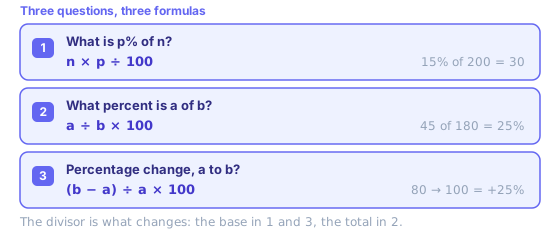
- Section 1 — taking a slice
- A tip, sales tax, a deposit, a commission, progress against a quota. You know the whole and you want part of it.
- Section 2 — comparing two numbers
- A test score, a conversion rate, one line item against a budget. You know both numbers and you want the ratio between them.
- Section 3 — measuring a move
- A price change, headcount, traffic month over month. Whichever value came first is always the divisor, which is what makes the answer directional.
One shortcut worth knowing: to find a percentage of a number, p% of n always equals n% of p. If 18% of 50 looks awkward, flip it — 50% of 18 is 9, and you did it in your head.
Reverse percentage: working back to the original number
This is the calculation people get wrong most often, because instinct says to subtract that same percentage again. You have to divide instead. If a price of £78 is what remains after a 30% increase, the original was 78 ÷ 1.30 = £60 — not 78 − 30%, which would give £54.60. Going the other way, if $90 is a price after 25% off, the original was 90 ÷ 0.75 = $120.
That asymmetry explains a result which looks like a bug. Take 100, add 10% to get 110, then take 10% off: you land on 99, not 100. Your increase was 10% of 100 and your decrease was 10% of 110, so a percentage increase or decrease of the same size is never the same amount. To undo a 10% rise you need a 9.09% cut. Stacked discounts behave this way too — 25% off then a further 20% off is 40% off in total, not 45%, because that second cut applies to an already reduced price.
To reverse anything with this percentage calculator, use section three: put your known figure in as the new value, try an original, and adjust until the percentage change matches what you were told. Or use the discount calculator, which reverses a sale price directly. If the same rate applies period after period rather than once, that is compounding, and the compound interest calculator is the right tool.
Percentage points are not percent change
When a rate moves from 20% to 25%, two different true statements describe it: it rose by 5 percentage points, and it rose by 25%. One is a plain gap between two percentages. The other is relative change, 5 ÷ 20 × 100, and that is what section three of this percentage calculator computes.
This matters whenever whatever is being measured is itself a percentage — interest rates, unemployment, market share, tax bands. “Approval climbed 25%” and “approval climbed 25 points” describe very different weeks. Comparing two percentages? Say points. Measuring growth? Say percent.
Percentage change in Excel and Google Sheets
Same formula, same in both. With the old value in A2 and the new value in B2, percentage change is =(B2-A2)/A2 with the cell formatted as Percentage, or =(B2-A2)/A2*100 if you want a plain number. =B2/A2-1 is the same sum written shorter.
Two things catch people out. A #DIV/0! means the old value is zero, and percentage change from zero is undefined — no formula fixes that, because there is no base to compare against. And if A2 and B2 are already percentages, subtracting them with =B2-A2 gives percentage points, not percent change; the full formula above gives the relative move.
Common percentage calculations
Worked-out pages for frequently searched sums, each with a reference table.
- 10% of 100
- 15% of 100
- 20% of 100
- 25% of 100
- 30% of 100
- 40% of 100
- 5% of 1,000
- 10% of 1,000
- 15% of 1,000
- 20% of 1,000
- 1% of 1,000
- 10% of 50
- 15% of 50
- 20% of 50
- 18% of 50
- 20% of 60
- 15% of 60
- 10% of 200
- 15% of 200
- 20% of 200
- 25% of 200
- 30% of 200
- 20% of 80
- 25% of 80
- 40% of 50
- 7% of 100
- 8% of 100
- 3% of 100,000
- 6% of 50,000
- 2% of 100,000
- 1% of 1,000,000
When to reach for a percentage calculator instead of mental math
Plenty of percentages are quicker in your head than in any tool. Ten per cent is a decimal point moved one place left; 5% is half of that; 20% is a fifth; 25% is a quarter; 1% is two places left. Chain them and you cover most of daily life — 17.5% is 10% plus 5% plus half of that 5%. A percentage calculator earns its place when numbers stop being round, when an answer feeds something else, or when being off by a few per cent actually costs money.
It also earns its place when a question runs backwards. To find a percentage of a number is one multiplication, but recovering an original figure from one that already includes a percentage increase or decrease means dividing, and dividing by 1.3 is not something most people do while standing at a till. Same goes for comparing two percentages measured against different bases — a 40% conversion rate on 20 visitors and a 30% rate on 2,000 are not really a 10-point story.
Where percentages bite hardest is in sequence. Applying a percentage increase or decrease twice does not double it, and reversing one does not use the same figure, because each step is measured against whatever a number happened to be at that moment. Anything involving repeated growth, where a rate applies to last period’s result rather than to one fixed starting number, is a different calculation altogether.
Precision is worth a thought too. This percentage calculator keeps four decimal places on amounts and two on rates — more than enough for a tip, not enough for a contract. Round at the end rather than at each step, or three rounded lines stop adding up to a rounded total. Accountants call that a penny difference, and it is a rounding-order problem rather than a maths error.
In-depth guides
- How Stacked Discounts Really Work: 30% + 20% Is Not 50%
Why successive discounts multiply, how coupon order changes the price, what “buy one get one” is really worth, and how to spot a discount that is not a deal.
- Exchange Rates Explained: Mid-Market Rates, Card Fees and What You Actually Pay
Where reference exchange rates come from, why your bank’s rate is different, how dynamic currency conversion costs you, and how to compare transfers.
Related tools
These free tools pair well with this page — open them in a new tab to finish your workflow.
Frequently Asked Questions
How do I calculate X% of Y?
Multiply Y by X/100. For example, 15% of 80 = 80 × 0.15 = 12. In the reverse, to find what percentage X is of Y: (X / Y) × 100. For example, 12 is what percent of 80? (12 / 80) × 100 = 15%.
What is percentage increase/decrease?
Percentage change = ((new value − old value) / old value) × 100. A positive result is an increase; negative is a decrease. For example, from 50 to 65: ((65 − 50) / 50) × 100 = 30% increase.
How do I find the original value before a percentage change?
If a value after a P% increase is V, the original = V / (1 + P/100). If after a P% decrease, original = V / (1 − P/100). For example, if a price of £78 is after a 30% increase, the original was 78 / 1.3 = £60.
What is the difference between percentage points and percent?
A percentage point is an absolute difference between two percentages. If the tax rate increases from 20% to 25%, it rose by 5 percentage points (not 5%). The relative percentage change would be (5/20) × 100 = 25%.
How do I add a percentage to a number?
Multiply the number by (1 + percentage/100). To add 20% to 150: 150 × 1.20 = 180. To subtract 20%: 150 × 0.80 = 120.
Why doesn't adding 10% then taking 10% off get me back to where I started?
Because the two steps are measured against different numbers. Add 10% to 100 and you get 110; take 10% off 110 and you remove 11, not 10, landing on 99. To undo a 10% increase you need a 9.09% decrease. The same applies to stacked discounts: 25% off followed by 20% off is 40% off in total, not 45%.
How do I work out the percentage discount between two prices?
Use percentage change with the original price as the starting value: (sale − original) / original × 100. From £80 down to £60 that is (60 − 80) / 80 × 100 = −25%, so 25% off. The discount calculator does the same sum and labels the result as savings.
Is p% of n the same as n% of p?
Yes, always, because both are n × p ÷ 100 with the multiplication in a different order. It is a genuinely useful shortcut: 18% of 50 is awkward, but the identical 50% of 18 is 9 and you can do it in your head.
Can this percentage calculator handle compound growth?
No — it measures a single before-and-after change. For a rate applied repeatedly over months or years, where each period grows on the last period's result, use the compound interest calculator instead.
What is the symbol for percentage change?
There is no single official one. Percent itself is %, and change is usually written with the Greek capital delta, so percentage change often appears as Δ% or %Δ in spreadsheets and reports. Percentage points are written pp or p.p. to keep them distinct from a percent change.