URL Encoder / Decoder – Encode or Decode Online
A URL encoder and decoder in one: percent-encode special characters and Unicode for safe use in a URL, or decode a percent-encoded URL back to readable text.
Which URL encoder mode do you need?
This is your one real decision, and that toggle above is all of it. encodeURIComponent is for one piece of a URL — one query value, one path segment, one token. It escapes every structural character, because inside one URL value those characters are text. encodeURI is for a whole URL, already assembled correctly and needing only its unsafe characters cleaned up, so it leaves URL structure alone.
Run https://example.com/search?q=hello world through both modes and your difference is obvious. encodeURI escapes only that space and leaves a working URL. Component mode escapes colon and both slashes as well, returning https%3A%2F%2Fexample.com%2F… — correct only when that entire URL is about to become one parameter inside another URL, such as an OAuth redirect target.
Rule of thumb: build your URL first, then encode each URL value as you put it in. If you find yourself running this URL encoder over text that already contains a ? you meant to keep, you want another mode.
What a URL encoder does to each character
Percent-encoding replaces a character with % and its byte in hex. Both URL encoder modes agree on most of that alphabet, and disagree on exactly those characters which give the URL its structure:
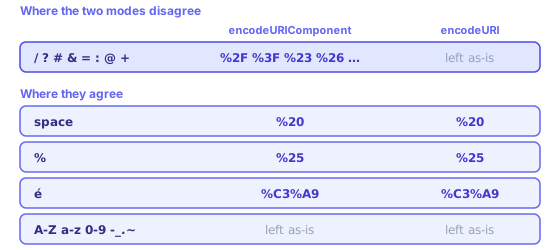
- space → %20
- Most parsers end a URL at its first space, and mail clients stop linking there.
- & → %26 / &
- Unencoded, this starts a new query parameter — commonest way one URL value gets truncated.
- = → %3D / =
- Splits key from value, so an unencoded = inside the value confuses strict parsers.
- ? → %3F / ?
- Starts a query string. Two raw question marks in one URL are tolerated but never portable.
- # → %23 / #
- Starts a fragment, and fragments never reach your server. Everything after a raw # is lost.
- / → %2F / /
- Separates path segments, so an unencoded / inside the value invents another segment.
- + → %2B / +
- Form decoders read this as space, which is why plus signs vanish from email addresses in a URL.
- % → %25
- Escapes itself. Skip this and an already-encoded URL decodes into nonsense twice over.
- é, 中, 🎉 → %C3%A9 …
- Encoded as UTF-8 bytes, so one character becomes two, three or four triplets.
Letters, digits and - _ . ~ are unreserved and never change in either mode. JavaScript also leaves ! * ' ( ) alone, which is that language rather than RFC 3986 — strict encoders escape those too, so two URL encoders can both be right and still disagree.
Double encoding, and the plus-sign trap
If you see %2520 in a URL, something encoded it twice. One pass turned space into %20; a second read that % as an ordinary character and turned it into %25, leaving %25 + 20. It happens when your framework already encoded the value and some helper did it again. Decode once here; if your result still holds % sequences, decode again, then fix whichever layer is doubling up.
Plus signs are another classic. In query strings built by an HTML form — application/x-www-form-urlencoded — space is written as +, not %20. Percent-decoding does not know that rule: decode a+b here and you get a+b back, not a b. When reading form data, replace + with space before decoding. Going outward, one real plus inside the value must become %2B or it arrives as space — which is exactly why name+tag@example.com keeps losing its plus in signup forms.
One security note: URL decoding is not sanitising. Decoded URL text can contain anything, so validate it before it reaches your database, your filesystem or another URL. Percent-encoding hides ../ and script tags just as happily as it hides spaces.
Where URL encoding shows up in practice
Tracking links are your everyday case: every UTM parameter, every ?q= pasted out of a search box. OAuth redirect URIs are what people get wrong, because a whole callback URL becomes one parameter inside an authorise URL and must be component-encoded. API tokens need it whenever Base64 puts + or / inside them. Non-ASCII hosts use a different scheme entirely — punycode, so münchen.de becomes xn--mnchen-3ya.de, while the URL path after it percent-encodes normally.
One confusion worth naming: URL encoding is not HTML encoding. Percent-encoding makes text safe inside a URL; HTML entities make text safe inside markup. One ampersand becomes %26 in a URL and & in a page, so if & is turning up in your address bar, something ran the HTML encoder where this one belonged.
In code the same two modes keep the same names. JavaScript gives you encodeURIComponent(value) and encodeURI(url), with decodeURIComponent and decodeURI to reverse them. Python splits the same idea into urllib.parse.quote and quote_plus, and PHP into rawurlencode (space becomes %20) and urlencode (space becomes +) — the plus-sign trap again, baked into a standard library.
A URL encoder is not the same job as making the URL readable. If you want Café Münster to become cafe-munster rather than Caf%C3%A9%20M%C3%BCnster, that is the slug generator. And if a token you are decoding turns out to be Base64 rather than percent-encoded, the Base64 decoder is the one you want.
Why a URL encoder exists at all
The URL was specified in 1994 with a deliberately small alphabet: letters, digits and a handful of punctuation marks, because the URL had to survive being written on paper, read down a phone line and retyped by hand. Everything outside that set gets smuggled through as percent-escapes, which is what percent-encoding is — one character becomes % followed by its byte value in hexadecimal, so %20 is simply byte 32, space.
RFC 3986 splits that alphabet in two, and this split is the whole idea. Unreserved characters — letters, digits and - _ . ~ — mean one thing everywhere and stay untouched. Reserved characters such as / ? # & = : @ are punctuation belonging to the URL itself, each with a job: separating path segments, starting the query, marking the fragment. Percent-encoding one says you want it read as text rather than as URL structure, which is why any URL encoder escapes the same character in one place and not another.
Non-ASCII text came later and works in two steps: each character becomes UTF-8 bytes, then every byte becomes its own triplet. That is why an accented letter costs two triplets, a CJK character three and an emoji four — and why the same URL in any language but English looks so much longer than its readable form. Decode with the wrong charset assumption and you get mojibake rather than an error, which makes it a quiet bug.
None of this is compression or security. A percent-encoded URL holds the same information in longer form, readable by anyone, and any URL decoder reverses it in one pass. Percent-encoding exists so arbitrary text can travel inside a format that reserves a dozen characters for its own grammar — nothing more, and nothing to rely on for hiding a URL value.
Worked examples
encodeURIComponent("café & crème")
  → caf%C3%A9%20%26%20cr%C3%A8me

encodeURI("https://example.com/a b?q=café&x=1")
  → https://example.com/a%20b?q=caf%C3%A9&x=1
Component mode encodes &, =, ? and / so a value cannot break out of its place in the URL; full-URL mode leaves those structural characters alone and only encodes what is not allowed anywhere. When building a query string in code, encode each value with encodeURIComponent, or let URLSearchParams do it for you.
Decoding pitfalls
- A + in a query string from an HTML form means a space; decodeURIComponent leaves it as +, so replace + with a space first when decoding form data.
- A stray % that is not followed by two hex digits makes decoding fail — the text was probably never encoded, or was cut off.
- If a value still contains %XX after decoding, it was encoded twice; decode once more.
Related tools
These free tools pair well with this page — open them in a new tab to finish your workflow.
Frequently Asked Questions
What is URL encoding?
URL encoding (percent-encoding) converts characters that are not allowed in URLs into a safe format. For example, spaces become %20 and & becomes %26.
When do I need to URL encode text?
You need to encode text when embedding it in a URL query string, especially if it contains special characters like spaces, &, =, +, or non-ASCII characters.
What is the difference between encodeURI and encodeURIComponent?
encodeURI encodes a full URL, leaving characters like /, ?, & intact. encodeURIComponent encodes a URL component (like a query value), converting those characters too. Use encodeURIComponent for individual parameter values.
Should I encode the entire URL or just parts?
Encode individual query parameter values, not the entire URL. Encoding the full URL would break its structure by encoding slashes and colons.
What characters do not need encoding?
Unreserved characters — letters (A–Z, a–z), digits (0–9), and -._~ — do not need encoding and are passed through as-is.
Is decoding safe for all encoded strings?
Decoding is generally safe, but be cautious about decoding untrusted input and then using it in a URL or database query, as it could introduce injection vulnerabilities.
Why does my URL contain %2520?
It was encoded twice. The first pass turned a space into %20; the second treated that % as an ordinary character and encoded it to %25, giving %2520. Decode twice to read it, then find the layer that is encoding an already-encoded value — usually a framework helper running after the value was prepared.
Why does a plus sign in my email address turn into a space?
HTML form submissions use application/x-www-form-urlencoded, where a space is written as + rather than %20. A real plus has to be sent as %2B or the receiver reads it as a space. Percent-decoding does not apply that rule, so decoding a+b here returns a+b, not a b.
Does this URL encoder handle emoji and non-Latin text?
Yes. The character is converted to UTF-8 bytes and each byte becomes its own %XX triplet, so an accented letter takes two triplets, a Chinese character three and an emoji four. é becomes %C3%A9 and U0001F389 becomes %F0%9F%8E%89.
How do I encode a non-English domain name?
You do not percent-encode it. Host names use punycode instead, so münchen.de becomes xn--mnchen-3ya.de. Only the path, query and fragment after the host use percent-encoding — browsers display the readable form and send the punycode one.