HTML Decoder & HTML Encoder – Decode HTML Online
An HTML encoder and decoder in one: escape the characters that would otherwise be read as markup into HTML entities, or decode HTML entities back to plain text.
67
Input chars
118
Output chars
Common HTML entities
Decode HTML entities online
Switch to Decode → Text, paste something like <p>Tom & Jerry</p> and this HTML decoder gives back <p>Tom & Jerry</p>. It runs in your browser as you type, so nothing you paste is uploaded.
You will see this job called several things. HTML decode, HTML unescape and HTML entity decoder all mean turning entities back into the characters they stand for; people looking to decode HTML online usually have text copied from page source, an RSS feed, a JSON API response or a database column that was escaped once too often. Some call it an HTML deobfuscator when a page hides an email address or a snippet behind numeric entities such as mail — decoding reveals that text, but it does not unpack minified or obfuscated JavaScript.
What an HTML encoder actually protects you from
A browser cannot tell your markup apart from markup that arrived in a comment box. It parses whatever it is given. An HTML encoder is how you say “treat this as text”:
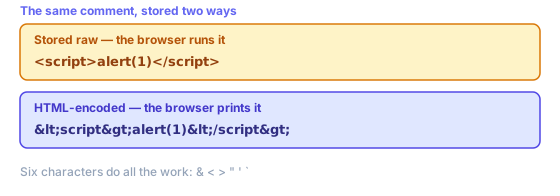
That is the whole mechanism behind escaping user content, and why an HTML encoder sits in the output path of almost every web framework. Six characters do all of it:
- <
- Opens tags. Left raw, comments containing <script> stop being text and become markup your browser runs.
- >
- Closes tags. Escaped mainly for symmetry, and because some parsers will happily repair half-broken tags for an attacker.
- &
- Starts every HTML entity, so it goes first. Escape it last and you re-escape ampersands you just created.
- "
- Ends double-quoted attribute values, letting anything after it become a new attribute — onerror, say.
- '
- Ends single-quoted attributes in exactly that way. Written numerically because ' is not in HTML 4 and older parsers ignore it.
- `
- Not special in HTML itself, but old versions of IE accepted backticks as attribute delimiters. Cheap to escape, so it is escaped.
Escaping is per context, not per value
This is what catches people out. Values are not “escaped” in general — they are escaped for somewhere. One string needs different treatment depending on where it lands, and the wrong scheme gives all the comfort of having escaped something with none of the protection:
- HTML body text
- What this HTML encoder is built for. Escape those six characters and user content renders as whatever someone typed.
- An attribute value
- Same HTML entities, but quote your attribute too. An unquoted attribute can be ended by a space, which no amount of escaping prevents.
- Inside a <script> block
- HTML entities do not help — JavaScript parsers never decode them. Serialise your value as JSON instead, or pass it through a data attribute and read it from the DOM.
- A URL or query string
- Percent-encoding, not HTML entities. Different alphabets solving different problems; neither substitutes for another.
- Inside a style block
- Neither scheme is enough. CSS has its own escape syntax and its own injection routes, so never build style rules out of user input.
If your destination is a link rather than a page, you want the URL encoder instead — ampersands are & in markup but %26 in URLs. Escape once, for the right destination, at the moment you write that value out.
Named, numeric and hex entities
Every character has three ways of being written as an HTML entity. An ampersand is & by name, & by decimal code point and & by hex. All three decode identically, and this HTML decoder accepts all three.
Named HTML entities read better, but only five are defined in XML: &, <, >, " and '. HTML defines well over a thousand more, which is why works in web pages and breaks RSS feeds. Numeric HTML entities are safe everywhere, so they are your right choice for XML, SVG and anything you cannot inspect.
Note that this HTML encoder writes ' rather than ' for an apostrophe, for exactly that reason — numeric HTML entities have always worked, and ' was not part of HTML 4.
Double encoding, and what this HTML decoder will not do
Seeing &lt; on a page means something escaped an already-escaped string. One pass turned < into <; a second read that ampersand as an ordinary character and turned it into &, so your reader gets literal text instead of a tag. Almost always some template escaped a value your framework had already escaped. Decode twice here to confirm, then remove one layer.
One honest limit: this HTML decoder handles numeric and hex entities in full, plus the couple of dozen named HTML entities you actually meet — , ©, — and friends. HTML defines far more, so rarer named entities such as ö pass through unchanged rather than becoming ö. If HTML entities survive a decode, that is why — and the numeric form of that character decodes correctly.
Decoding is also not a security step. An HTML encoder protects whatever page displays your value; decoding hands back original characters, tags and all. Never decode untrusted input and then insert that result into your page — it undoes the protection an HTML encoder just gave you.
When to reach for an HTML encoder, and when the framework has it covered
Most of the time you should not be calling an HTML encoder by hand at all. React, Vue, Svelte, Rails, Django and Laravel all escape interpolated values on their way out by default, which is why XSS stopped being routine in ordinary app code. Bugs now cluster at deliberate escape hatches — dangerouslySetInnerHTML, v-html, html_safe, |safe — where you told your framework to stop escaping HTML for you.
So the honest use for a standalone HTML encoder is everything outside that path: pasting a snippet into a blog post so its tags show as tags rather than rendering, putting markup inside an XML or RSS field, writing an email template by hand, or cleaning a legacy dump where someone stored HTML entities, someone else stored raw text, and nobody wrote down which column is which.
An HTML encoder is also the quickest way to see what a value will actually become. Escaping is hard to reason about from memory because each layer looks reasonable alone, and its failures — a doubled HTML entity, an unescaped attribute, an entity that survived decoding — are obvious once you see before and after side by side. Paste your string in, read the output, and the answer stops being a guess.
What no HTML encoder can do is decide where your value is going. It escapes for markup and nothing else, so values bound for script blocks, URLs or stylesheets need a different scheme entirely. Getting that call right is the actual skill; escaping HTML itself is a lookup table.
Related tools
These free tools pair well with this page — open them in a new tab to finish your workflow.
Frequently Asked Questions
What is an HTML decoder?
An HTML decoder turns HTML entities back into the characters they stand for: < becomes <, & becomes &, ' becomes an apostrophe and — becomes an em dash. It is the reverse of an HTML encoder. The same job is also called HTML decode, HTML unescape or HTML entity decoding.
How do I decode HTML entities online?
Choose Decode → Text above and paste your escaped text. The decoded output updates as you type, and Copy puts it on your clipboard. Named entities (&, ", ), decimal entities (&) and hex entities (&) are all handled, and decoding happens in your browser, so nothing is uploaded.
Is HTML unescape the same as HTML decode?
Yes. Escape and encode are two words for the same thing, and so are unescape and decode. JavaScript libraries tend to say escape/unescape (lodash's _.unescape, for example), while online tools tend to say encode/decode. Either way, <b> comes back as <b>.
What is HTML encoding?
HTML encoding (escaping) converts characters that have special meaning in HTML into their entity equivalents so they display as literal text. For example, < becomes <, > becomes >, & becomes &, and " becomes ".
When should I encode HTML?
Any time you insert user-supplied or untrusted text into an HTML page, you must encode it. Without encoding, characters like < and > could be interpreted as HTML tags, potentially creating cross-site scripting (XSS) vulnerabilities.
Which characters does this HTML encoder escape?
Six: & < > " ' and the backtick. The ampersand is escaped first, because it starts every entity and escaping it last would re-escape the entities just created. The apostrophe is written as ' rather than ', and the backtick as ` because older versions of Internet Explorer accepted backticks as attribute delimiters.
Why is &amp;lt; showing up on my page?
Something escaped an already-escaped string. The first pass turned < into <; the second treated that ampersand as ordinary text and turned it into &, so the reader sees the literal characters < rather than a tag. Usually a template is escaping a value the framework had already escaped — remove one of the two layers.
Does HTML encoding stop every XSS attack?
No. It protects a value rendered into HTML body text or a quoted attribute. It does nothing for a value dropped into a script block, because the JavaScript parser never decodes entities, and nothing for a URL or a stylesheet. Escaping is chosen per destination, and the wrong scheme offers no protection at all.
Why did ö survive decoding?
This decoder handles numeric entities like ö and hex entities like ö in full, plus the couple of dozen named entities you meet in practice. HTML defines well over a thousand named entities, so a rarer one passes through unchanged. The numeric form of the same character will decode correctly.
Are HTML entities the same as URL encoding?
No. They solve the same kind of problem in different places. An ampersand is & inside markup and %26 inside a URL, and neither substitutes for the other. Use HTML entities for anything the browser parses as HTML, and percent-encoding for anything that goes into a link.