Base64 Encoder & Decoder – Encode/Decode Online
A free Base64 encoder and decoder: encode text to Base64, or decode a Base64 string back to plain text. Unicode, emoji and non-Latin characters are handled correctly, and nothing leaves your browser.
How to encode text to Base64 or decode a Base64 string
- Pick a direction. Encode turns readable text into Base64; Decode turns a Base64 string back into plain text.
- Paste into the top box. The conversion runs on every keystroke, in this tab — there is no upload step and no server round trip, so pasting a token or a customer record is safe.
- Read the result underneath, then hit Copy. If decoding fails, the box stays empty and an error appears; the causes are listed further down this page.
- Use Swap to feed output straight back in as input. Encode, swap, then decode a Base64 string back to plain text and you should get exactly what you started with — a quick way to confirm a clean round trip.
How Base64 encoding works, one block at a time
Take Hi! — three characters. In UTF-8 they are bytes 72, 105 and 33, 24 bits in total. A Base64 encoder ignores those byte boundaries and re-slices all 24 bits into four groups of six:
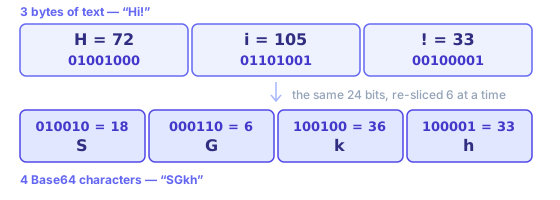
Each 6-bit group is a number from 0 to 63, and each number picks one character out of a 64-character alphabet: 0–25 are A–Z, 26–51 are a–z, 52–61 are 0–9, 62 is + and 63 is /. So 18, 6, 36 and 33 become SGkh. Three bytes in, four characters out, every time.
Padding is what happens when input does not divide by three. Encode Hi — two bytes, 16 bits — and you get SGk=: three real characters and one = to fill out that block. Drop to a single H and it is SA==. Those = characters carry no data; they only keep Base64 output a multiple of four, so a Base64 decoder knows where a final block ends.
Where a Base64 encoder is actually used
Every one of these exists for one reason: a channel in the middle only accepts text.
- Data URIs in CSS and HTML
- A small icon written as data:image/png;base64,iVBORw0… ships inside a stylesheet, so browsers draw it without a second request. Worth doing under a couple of kilobytes; past that, Base64’s 33% overhead costs more than a saved round trip. The image to Base64 converter builds the whole data URI for you.
- Binary fields in JSON APIs
- JSON has no byte type. A signature, a thumbnail or a PDF travels as a Base64 string field, and whatever reads it runs a Base64 decoder to get those bytes back.
- HTTP Basic authentication
- The header is literally Authorization: Basic plus Base64 of "user:password". It is obfuscation, not protection — which is why Basic auth is only safe over HTTPS.
- JWTs and signed tokens
- A JWT’s header and payload are URL-safe Base64. Paste either segment here to read its claims; segment three is a signature and will not decode to readable text. The JWT decoder splits the three segments for you.
- Email attachments (MIME)
- SMTP was built for 7-bit text, so attachments travel Base64-encoded with Content-Transfer-Encoding: base64 and line breaks every 76 characters.
- Secrets in config and CI
- Kubernetes Secrets and many CI variables hold Base64 values so certificates and keys survive YAML. Base64 keeps those bytes intact; it does not keep them private.
Why your Base64 decoder says “Invalid Base64 string”
A string that refuses to decode is almost never corrupt. It is one of these five, roughly in order of how often they come up:
- URL-safe alphabet
- The string contains - and _ where a standard Base64 decoder expects + and /. Swap them back before decoding — JWTs, OAuth state and signed URLs all use this variant. If percent-encoding is what you actually wanted, that is the URL encoder, not Base64.
- Missing padding
- A valid Base64 string is a multiple of four characters long. URL-safe encoders often drop trailing = signs; add one or two back until its length divides by four.
- Line breaks and stray spaces
- MIME wraps output at 76 characters, and copying from a terminal or an email header adds newlines. Strip that whitespace and your Base64 string usually decodes fine.
- It was never text
- A PNG or a PDF decodes to bytes, not to readable characters, so a text-only Base64 decoder shows garbage. That is binary data, not an invalid string — see below for how to decode Base64 to a file.
- Double encoding
- If one decode pass returns something that still looks like Base64 — all letters, digits and a trailing = — it was encoded twice. Press decode again.
When you are not sure which it is, paste your string into both panes. If encode gives you something and decode errors, you are holding plain text, not Base64.
Decoding Base64 to an image, a PDF or any other file
This page handles UTF-8 text in both directions. Files are a different job, because the result has to be saved as bytes rather than shown as characters:
- Images (PNG, JPEG, WebP, SVG)
- The image to Base64 converter goes both ways: drop a file to get a data URI or raw Base64, or paste a Base64 image back and download the picture.
- PDFs and everything else
- The shell is the shortest route, and it works the same on macOS and Linux:
base64 < report.pdf > report.txtto encode, andbase64 -d < report.txt > report.pdfto decode. The bytes never leave your machine either way. - A data URI you were handed
- Everything up to and including the comma in
data:application/pdf;base64,is a MIME prefix, not Base64. Drop it first; what follows the comma is the part a Base64 decoder wants.
What Is Base64 Encoding, and When Should You Use It?
Base64 is a way of writing binary data using only 64 printable ASCII characters: A–Z, a–z, 0–9, plus (+) and slash (/), with an equals sign (=) reserved for padding. Those 64 characters survive every system that was built for text and might mangle, reinterpret or truncate raw bytes, which is why Base64 exists at all.
Four characters out for every three bytes in is where Base64’s familiar ~33% size overhead comes from. Output is always larger than what went in, never smaller, which makes Base64 a transport format rather than a compression format — gzip a payload before encoding it, never after.
Padding is why so many Base64 strings end in one or two equals signs, and why a Base64 string whose length does not divide by four usually means something was truncated in transit rather than encoded wrongly.
Text has to become bytes before any of this happens, and whichever character encoding you pick decides which bytes. This Base64 encoder uses UTF-8, so "你好" becomes six bytes and then "5L2g5aW9", while a party popper emoji 🎉 becomes four bytes and then "8J+OiQ==". If you encode text as UTF-8 and decode it as Latin-1 somewhere downstream, your Base64 round trip was perfect and mojibake came from a mismatched charset, not from Base64 itself.
Base64 is not encryption and not a hash. It has no key, it is perfectly reversible, and any Base64 decoder — including this page — will read it instantly. Never use it to hide an API token, a password or personal data. Reach for real encryption when something must stay secret, or a hash when you only need to compare values. Base64’s one real strength is carrying bytes through a text-only pipe unchanged.
Worked examples
"hello"  → aGVsbG8=
"café"   → Y2Fmw6k=
"你好"    → 5L2g5aW9

Decoding also accepts URL-safe Base64 without padding, as used in JWTs:
eyJhbGciOiJIUzI1NiIsInR5cCI6IkpXVCJ9 → {"alg":"HS256","typ":"JWT"}
Text is converted to UTF-8 bytes before encoding, so accented letters and Chinese characters round-trip exactly. Line breaks and spaces in pasted Base64 are ignored when decoding, and output that is not valid UTF-8 text — for example Base64 of an image or a ZIP file — is reported as an error rather than shown as garbled characters.
Related tools
These free tools pair well with this page — open them in a new tab to finish your workflow.
Frequently Asked Questions
What is Base64?
Base64 is an encoding scheme that converts binary data (or text) into a string of ASCII characters. It is commonly used to transmit data in contexts that only support text, like email attachments, data URIs in CSS/HTML, or JSON payloads.
Does Base64 encrypt my data?
No. Base64 is encoding, not encryption. Anyone who receives a Base64 string can trivially decode it. Do not use Base64 to hide sensitive information — use proper encryption instead.
What is the size overhead of Base64?
Base64 encoding increases data size by approximately 33%. Every 3 bytes of input become 4 Base64 characters. This is an important consideration when embedding large images or files as Base64 strings.
What is URL-safe Base64?
Standard Base64 uses + and / characters, which have special meaning in URLs. URL-safe Base64 replaces + with - and / with _, making the output safe to include in query strings and path parameters without percent-encoding.
Can I encode or decode binary files with this tool?
This page handles text (UTF-8); pasting raw binary into it produces incorrect results. For images, use the Image to Base64 converter, which encodes a file to a data URI and decodes a Base64 image back to a downloadable PNG. For a PDF or any other file, run base64 < file > file.txt to encode and base64 -d < file.txt > file to decode.
What does 'invalid Base64' mean?
A valid Base64 string contains only A–Z, a–z, 0–9, +, /, and = (padding). If the string contains other characters, or its length does not divide by 4 once padding is accounted for, decoding will fail.
Is Base64 the same as ASCII encoding?
No. ASCII is a character encoding standard that maps characters to byte values. Base64 is a binary-to-text encoding scheme. The two are unrelated, though Base64 output happens to consist entirely of ASCII characters.
Does this Base64 encoder send my text anywhere?
No. Whether you encode text to Base64 or decode a Base64 string back to plain text, the work happens in your browser tab via the built-in btoa and atob functions, so your text never reaches a server and is never logged. That makes it safe to decode a token or a customer record while debugging.
How do I encode text to Base64 from the command line?
On macOS and Linux, printf 'Hi!' | base64 prints SGkh, and base64 -d decodes. In PowerShell use [Convert]::ToBase64String([Text.Encoding]::UTF8.GetBytes('Hi!')). In Node it is Buffer.from('Hi!').toString('base64'), and in Python base64.b64encode(b'Hi!').
Why does my Base64 string contain line breaks?
MIME-style encoders wrap the output every 76 characters so it survives email transport, and the openssl base64 command does this by default. The line breaks carry no data — strip them (or pass -A to openssl) and the string decodes normally.