什么是 Base64,何时使用?
将文本编码为 Base64,或将 Base64 字符串解码为纯文本,支持 Unicode 和表情符号。
How to encode text to Base64 or decode a Base64 string
- Pick a direction. Encode turns readable text into Base64; Decode turns a Base64 string back into plain text.
- Paste into the top box. The conversion runs on every keystroke, in this tab — there is no upload step and no server round trip, so pasting a token or a customer record is safe.
- Read the result underneath, then hit Copy. If decoding fails, the box stays empty and an error appears; the causes are listed further down this page.
- Use Swap to feed output straight back in as input. Encode, swap, then decode a Base64 string back to plain text and you should get exactly what you started with — a quick way to confirm a clean round trip.
How Base64 encoding works, one block at a time
Take Hi! — three characters. In UTF-8 they are bytes 72, 105 and 33, 24 bits in total. A Base64 encoder ignores those byte boundaries and re-slices all 24 bits into four groups of six:
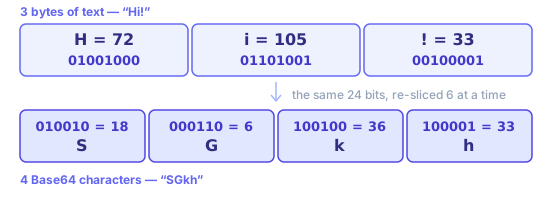
Each 6-bit group is a number from 0 to 63, and each number picks one character out of a 64-character alphabet: 0–25 are A–Z, 26–51 are a–z, 52–61 are 0–9, 62 is + and 63 is /. So 18, 6, 36 and 33 become SGkh. Three bytes in, four characters out, every time.
Padding is what happens when input does not divide by three. Encode Hi — two bytes, 16 bits — and you get SGk=: three real characters and one = to fill out that block. Drop to a single H and it is SA==. Those = characters carry no data; they only keep Base64 output a multiple of four, so a Base64 decoder knows where a final block ends.
Where a Base64 encoder is actually used
Every one of these exists for one reason: a channel in the middle only accepts text.
- Data URIs in CSS and HTML
- A small icon written as data:image/png;base64,iVBORw0… ships inside a stylesheet, so browsers draw it without a second request. Worth doing under a couple of kilobytes; past that, Base64’s 33% overhead costs more than a saved round trip. The image to Base64 converter builds the whole data URI for you.
- Binary fields in JSON APIs
- JSON has no byte type. A signature, a thumbnail or a PDF travels as a Base64 string field, and whatever reads it runs a Base64 decoder to get those bytes back.
- HTTP Basic authentication
- The header is literally Authorization: Basic plus Base64 of "user:password". It is obfuscation, not protection — which is why Basic auth is only safe over HTTPS.
- JWTs and signed tokens
- A JWT’s header and payload are URL-safe Base64. Paste either segment here to read its claims; segment three is a signature and will not decode to readable text. The JWT decoder splits the three segments for you.
- Email attachments (MIME)
- SMTP was built for 7-bit text, so attachments travel Base64-encoded with Content-Transfer-Encoding: base64 and line breaks every 76 characters.
- Secrets in config and CI
- Kubernetes Secrets and many CI variables hold Base64 values so certificates and keys survive YAML. Base64 keeps those bytes intact; it does not keep them private.
Why your Base64 decoder says “Invalid Base64 string”
A string that refuses to decode is almost never corrupt. It is one of these five, roughly in order of how often they come up:
- URL-safe alphabet
- The string contains - and _ where a standard Base64 decoder expects + and /. Swap them back before decoding — JWTs, OAuth state and signed URLs all use this variant. If percent-encoding is what you actually wanted, that is the URL encoder, not Base64.
- Missing padding
- A valid Base64 string is a multiple of four characters long. URL-safe encoders often drop trailing = signs; add one or two back until its length divides by four.
- Line breaks and stray spaces
- MIME wraps output at 76 characters, and copying from a terminal or an email header adds newlines. Strip that whitespace and your Base64 string usually decodes fine.
- It was never text
- A PNG or a PDF decodes to bytes, not to readable characters, so a text-only Base64 decoder shows garbage. That is binary data, not an invalid string — see below for how to decode Base64 to a file.
- Double encoding
- If one decode pass returns something that still looks like Base64 — all letters, digits and a trailing = — it was encoded twice. Press decode again.
When you are not sure which it is, paste your string into both panes. If encode gives you something and decode errors, you are holding plain text, not Base64.
Decoding Base64 to an image, a PDF or any other file
This page handles UTF-8 text in both directions. Files are a different job, because the result has to be saved as bytes rather than shown as characters:
- Images (PNG, JPEG, WebP, SVG)
- The image to Base64 converter goes both ways: drop a file to get a data URI or raw Base64, or paste a Base64 image back and download the picture.
- PDFs and everything else
- The shell is the shortest route, and it works the same on macOS and Linux:
base64 < report.pdf > report.txtto encode, andbase64 -d < report.txt > report.pdfto decode. The bytes never leave your machine either way. - A data URI you were handed
- Everything up to and including the comma in
data:application/pdf;base64,is a MIME prefix, not Base64. Drop it first; what follows the comma is the part a Base64 decoder wants.
什么是 Base64,何时使用?
Base64 用 64 个可打印 ASCII 字符表示二进制(A–Z、a–z、0–9、+、/ 与填充符 =)。每 3 字节变为 4 个字符(约增加 33% 体积),便于在 JSON、邮件或 data URI 中传输二进制。
常见用途:CSS/HTML 内联小图(data URI)、API 中的二进制字段、MIME 附件。HTTP Basic 也在头里用 Base64 编码 用户名:密码。
Base64 不是加密,可被轻易解码。不要用其“隐藏”密钥或密码;应使用正规加密或哈希。本工具仅用于传输编码与调试。
Text has to become bytes before any of this happens, and whichever character encoding you pick decides which bytes. This Base64 encoder uses UTF-8, so "你好" becomes six bytes and then "5L2g5aW9", while a party popper emoji 🎉 becomes four bytes and then "8J+OiQ==". If you encode text as UTF-8 and decode it as Latin-1 somewhere downstream, your Base64 round trip was perfect and mojibake came from a mismatched charset, not from Base64 itself.
Base64 is not encryption and not a hash. It has no key, it is perfectly reversible, and any Base64 decoder — including this page — will read it instantly. Never use it to hide an API token, a password or personal data. Reach for real encryption when something must stay secret, or a hash when you only need to compare values. Base64’s one real strength is carrying bytes through a text-only pipe unchanged.
Worked examples
"hello"  → aGVsbG8=
"café"   → Y2Fmw6k=
"你好"    → 5L2g5aW9

Decoding also accepts URL-safe Base64 without padding, as used in JWTs:
eyJhbGciOiJIUzI1NiIsInR5cCI6IkpXVCJ9 → {"alg":"HS256","typ":"JWT"}
Text is converted to UTF-8 bytes before encoding, so accented letters and Chinese characters round-trip exactly. Line breaks and spaces in pasted Base64 are ignored when decoding, and output that is not valid UTF-8 text — for example Base64 of an image or a ZIP file — is reported as an error rather than shown as garbled characters.
In-depth guides
- Base64 and URL Encoding: When to Use Which
Base64 is not encryption. Learn URL-safe variants, where padding matters, and how to avoid double-encoding form fields and API query strings.
Related tools
These free tools pair well with this page — open them in a new tab to finish your workflow.
常见问题
什么是Base64?
Base64是一种将二进制数据(或文本)转换为ASCII字符串的编码方案。常用于在只支持文本的场景中传输数据,例如电子邮件附件、CSS/HTML中的数据URI或JSON载荷。
Base64会加密我的数据吗?
不会。Base64是编码而非加密,任何人都可以轻松解码Base64字符串。请勿使用Base64来隐藏敏感信息——应使用适当的加密算法。
Base64的大小开销是多少?
Base64编码会将数据大小增加约33%。每3个字节的输入变成4个Base64字符。在将大型图片或文件嵌入为Base64字符串时,这是一个重要考量。
什么是URL安全的Base64?
标准Base64使用+和/字符,这在URL中有特殊含义。URL安全Base64将+替换为-,将/替换为_,使输出可以安全地包含在查询字符串和路径参数中,无需百分号编码。
我可以用这个工具编码二进制文件吗?
此工具对文本(UTF-8)进行编码和解码。对于图片或PDF等二进制文件,您需要先读取原始字节再进行编码。将二进制数据作为文本粘贴可能会产生错误结果。
"无效的Base64"是什么意思?
有效的Base64字符串只包含A–Z、a–z、0–9、+、/和=(填充)。如果字符串包含其他字符,或者去除填充后长度不是4的倍数,解码将失败。
Base64和ASCII编码相同吗?
不同。ASCII是将字符映射到字节值的字符编码标准,而Base64是一种二进制到文本的编码方案。两者并无关联,尽管Base64的输出恰好完全由ASCII字符组成。