Base64란 무엇이며 언제 쓰나요?
텍스트를 Base64로 인코딩하거나 Base64를 텍스트로 디코딩합니다. 유니코드, 이모지 지원.
How to encode text to Base64 or decode a Base64 string
- Pick a direction. Encode turns readable text into Base64; Decode turns a Base64 string back into plain text.
- Paste into the top box. The conversion runs on every keystroke, in this tab — there is no upload step and no server round trip, so pasting a token or a customer record is safe.
- Read the result underneath, then hit Copy. If decoding fails, the box stays empty and an error appears; the causes are listed further down this page.
- Use Swap to feed output straight back in as input. Encode, swap, then decode a Base64 string back to plain text and you should get exactly what you started with — a quick way to confirm a clean round trip.
How Base64 encoding works, one block at a time
Take Hi! — three characters. In UTF-8 they are bytes 72, 105 and 33, 24 bits in total. A Base64 encoder ignores those byte boundaries and re-slices all 24 bits into four groups of six:
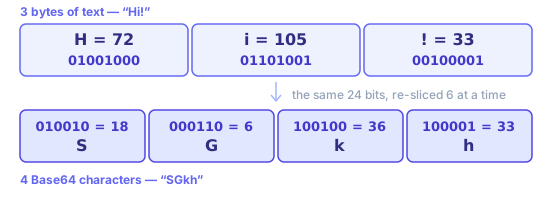
Each 6-bit group is a number from 0 to 63, and each number picks one character out of a 64-character alphabet: 0–25 are A–Z, 26–51 are a–z, 52–61 are 0–9, 62 is + and 63 is /. So 18, 6, 36 and 33 become SGkh. Three bytes in, four characters out, every time.
Padding is what happens when input does not divide by three. Encode Hi — two bytes, 16 bits — and you get SGk=: three real characters and one = to fill out that block. Drop to a single H and it is SA==. Those = characters carry no data; they only keep Base64 output a multiple of four, so a Base64 decoder knows where a final block ends.
Where a Base64 encoder is actually used
Every one of these exists for one reason: a channel in the middle only accepts text.
- Data URIs in CSS and HTML
- A small icon written as data:image/png;base64,iVBORw0… ships inside a stylesheet, so browsers draw it without a second request. Worth doing under a couple of kilobytes; past that, Base64’s 33% overhead costs more than a saved round trip. The image to Base64 converter builds the whole data URI for you.
- Binary fields in JSON APIs
- JSON has no byte type. A signature, a thumbnail or a PDF travels as a Base64 string field, and whatever reads it runs a Base64 decoder to get those bytes back.
- HTTP Basic authentication
- The header is literally Authorization: Basic plus Base64 of "user:password". It is obfuscation, not protection — which is why Basic auth is only safe over HTTPS.
- JWTs and signed tokens
- A JWT’s header and payload are URL-safe Base64. Paste either segment here to read its claims; segment three is a signature and will not decode to readable text. The JWT decoder splits the three segments for you.
- Email attachments (MIME)
- SMTP was built for 7-bit text, so attachments travel Base64-encoded with Content-Transfer-Encoding: base64 and line breaks every 76 characters.
- Secrets in config and CI
- Kubernetes Secrets and many CI variables hold Base64 values so certificates and keys survive YAML. Base64 keeps those bytes intact; it does not keep them private.
Why your Base64 decoder says “Invalid Base64 string”
A string that refuses to decode is almost never corrupt. It is one of these five, roughly in order of how often they come up:
- URL-safe alphabet
- The string contains - and _ where a standard Base64 decoder expects + and /. Swap them back before decoding — JWTs, OAuth state and signed URLs all use this variant. If percent-encoding is what you actually wanted, that is the URL encoder, not Base64.
- Missing padding
- A valid Base64 string is a multiple of four characters long. URL-safe encoders often drop trailing = signs; add one or two back until its length divides by four.
- Line breaks and stray spaces
- MIME wraps output at 76 characters, and copying from a terminal or an email header adds newlines. Strip that whitespace and your Base64 string usually decodes fine.
- It was never text
- A PNG or a PDF decodes to bytes, not to readable characters, so a text-only Base64 decoder shows garbage. That is binary data, not an invalid string — see below for how to decode Base64 to a file.
- Double encoding
- If one decode pass returns something that still looks like Base64 — all letters, digits and a trailing = — it was encoded twice. Press decode again.
When you are not sure which it is, paste your string into both panes. If encode gives you something and decode errors, you are holding plain text, not Base64.
Decoding Base64 to an image, a PDF or any other file
This page handles UTF-8 text in both directions. Files are a different job, because the result has to be saved as bytes rather than shown as characters:
- Images (PNG, JPEG, WebP, SVG)
- The image to Base64 converter goes both ways: drop a file to get a data URI or raw Base64, or paste a Base64 image back and download the picture.
- PDFs and everything else
- The shell is the shortest route, and it works the same on macOS and Linux:
base64 < report.pdf > report.txtto encode, andbase64 -d < report.txt > report.pdfto decode. The bytes never leave your machine either way. - A data URI you were handed
- Everything up to and including the comma in
data:application/pdf;base64,is a MIME prefix, not Base64. Drop it first; what follows the comma is the part a Base64 decoder wants.
Base64란 무엇이며 언제 쓰나요?
Base64는 이진 데이터를 64개의 출력 가능 ASCII로 표현합니다. 3바이트가 4문자로 늘어나(~33%) JSON, 이메일, data URI에 담기 쉽습니다.
용도: CSS/HTML data URI, JSON API의 바이너리 필드, MIME 첨부. HTTP Basic 헤더 인코딩에도 사용됩니다.
Base64는 암호화가 아닙니다. 비밀을 숨기는 데 사용하지 마세요. 이 도구는 전송용 인코딩·디버깅용입니다.
Text has to become bytes before any of this happens, and whichever character encoding you pick decides which bytes. This Base64 encoder uses UTF-8, so "你好" becomes six bytes and then "5L2g5aW9", while a party popper emoji 🎉 becomes four bytes and then "8J+OiQ==". If you encode text as UTF-8 and decode it as Latin-1 somewhere downstream, your Base64 round trip was perfect and mojibake came from a mismatched charset, not from Base64 itself.
Base64 is not encryption and not a hash. It has no key, it is perfectly reversible, and any Base64 decoder — including this page — will read it instantly. Never use it to hide an API token, a password or personal data. Reach for real encryption when something must stay secret, or a hash when you only need to compare values. Base64’s one real strength is carrying bytes through a text-only pipe unchanged.
Worked examples
"hello"  → aGVsbG8=
"café"   → Y2Fmw6k=
"你好"    → 5L2g5aW9

Decoding also accepts URL-safe Base64 without padding, as used in JWTs:
eyJhbGciOiJIUzI1NiIsInR5cCI6IkpXVCJ9 → {"alg":"HS256","typ":"JWT"}
Text is converted to UTF-8 bytes before encoding, so accented letters and Chinese characters round-trip exactly. Line breaks and spaces in pasted Base64 are ignored when decoding, and output that is not valid UTF-8 text — for example Base64 of an image or a ZIP file — is reported as an error rather than shown as garbled characters.
In-depth guides
- Base64 and URL Encoding: When to Use Which
Base64 is not encryption. Learn URL-safe variants, where padding matters, and how to avoid double-encoding form fields and API query strings.
Related tools
These free tools pair well with this page — open them in a new tab to finish your workflow.
자주 묻는 질문
Base64란 무엇인가요?
Base64는 이진 데이터(또는 텍스트)를 ASCII 문자열로 변환하는 인코딩 방식입니다. 이메일 첨부 파일, CSS/HTML의 데이터 URI, JSON 페이로드 등 텍스트만 지원하는 환경에서 데이터를 전송할 때 주로 사용됩니다.
Base64는 데이터를 암호화하나요?
아니요. Base64는 인코딩이지 암호화가 아닙니다. Base64 문자열을 받은 사람은 누구나 쉽게 디코딩할 수 있습니다. 민감한 정보를 숨기는 데 Base64를 사용하지 마세요. 적절한 암호화를 사용하세요.
Base64의 크기 오버헤드는 얼마나 되나요?
Base64 인코딩은 데이터 크기를 약 33% 증가시킵니다. 입력 3바이트마다 Base64 문자 4개가 생성됩니다. 대용량 이미지나 파일을 Base64 문자열로 포함할 때 중요한 고려 사항입니다.
URL 안전 Base64란 무엇인가요?
표준 Base64는 URL에서 특별한 의미를 가지는 +와 /를 사용합니다. URL 안전 Base64는 +를 -로, /를 _로 대체하여 퍼센트 인코딩 없이도 쿼리 문자열과 경로 매개변수에 안전하게 포함할 수 있습니다.
이 도구로 바이너리 파일을 인코딩할 수 있나요?
이 도구는 텍스트(UTF-8)를 인코딩 및 디코딩합니다. 이미지나 PDF 같은 바이너리 파일은 인코딩 전에 원시 바이트를 읽는 도구가 필요합니다. 바이너리 데이터를 텍스트로 붙여넣으면 잘못된 결과가 나올 수 있습니다.
'잘못된 Base64'는 무슨 의미인가요?
유효한 Base64 문자열에는 A–Z, a–z, 0–9, +, /, =(패딩)만 포함됩니다. 다른 문자가 포함되거나 패딩을 고려한 길이가 4의 배수가 아니면 디코딩이 실패합니다.
Base64와 ASCII 인코딩은 같은 건가요?
아니요. ASCII는 문자를 바이트 값에 매핑하는 문자 인코딩 표준입니다. Base64는 이진 데이터를 텍스트로 변환하는 인코딩 방식입니다. 둘은 관련이 없지만, Base64 출력은 우연히 모두 ASCII 문자로 구성됩니다.