When to reach for an HTML encoder, and when the framework has it covered
특수문자를 HTML 엔티티로 변환하거나 HTML 엔티티를 일반 텍스트로 디코딩합니다.
67
Input chars
118
Output chars
Common HTML entities
Decode HTML entities online
Switch to Decode → Text, paste something like <p>Tom & Jerry</p> and this HTML decoder gives back <p>Tom & Jerry</p>. It runs in your browser as you type, so nothing you paste is uploaded.
You will see this job called several things. HTML decode, HTML unescape and HTML entity decoder all mean turning entities back into the characters they stand for; people looking to decode HTML online usually have text copied from page source, an RSS feed, a JSON API response or a database column that was escaped once too often. Some call it an HTML deobfuscator when a page hides an email address or a snippet behind numeric entities such as mail — decoding reveals that text, but it does not unpack minified or obfuscated JavaScript.
What an HTML encoder actually protects you from
A browser cannot tell your markup apart from markup that arrived in a comment box. It parses whatever it is given. An HTML encoder is how you say “treat this as text”:
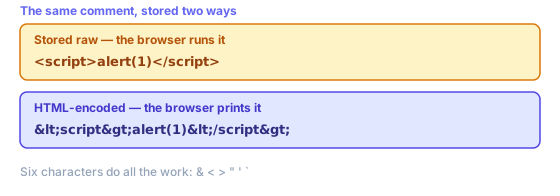
That is the whole mechanism behind escaping user content, and why an HTML encoder sits in the output path of almost every web framework. Six characters do all of it:
- <
- Opens tags. Left raw, comments containing <script> stop being text and become markup your browser runs.
- >
- Closes tags. Escaped mainly for symmetry, and because some parsers will happily repair half-broken tags for an attacker.
- &
- Starts every HTML entity, so it goes first. Escape it last and you re-escape ampersands you just created.
- "
- Ends double-quoted attribute values, letting anything after it become a new attribute — onerror, say.
- '
- Ends single-quoted attributes in exactly that way. Written numerically because ' is not in HTML 4 and older parsers ignore it.
- `
- Not special in HTML itself, but old versions of IE accepted backticks as attribute delimiters. Cheap to escape, so it is escaped.
Escaping is per context, not per value
This is what catches people out. Values are not “escaped” in general — they are escaped for somewhere. One string needs different treatment depending on where it lands, and the wrong scheme gives all the comfort of having escaped something with none of the protection:
- HTML body text
- What this HTML encoder is built for. Escape those six characters and user content renders as whatever someone typed.
- An attribute value
- Same HTML entities, but quote your attribute too. An unquoted attribute can be ended by a space, which no amount of escaping prevents.
- Inside a <script> block
- HTML entities do not help — JavaScript parsers never decode them. Serialise your value as JSON instead, or pass it through a data attribute and read it from the DOM.
- A URL or query string
- Percent-encoding, not HTML entities. Different alphabets solving different problems; neither substitutes for another.
- Inside a style block
- Neither scheme is enough. CSS has its own escape syntax and its own injection routes, so never build style rules out of user input.
If your destination is a link rather than a page, you want the URL encoder instead — ampersands are & in markup but %26 in URLs. Escape once, for the right destination, at the moment you write that value out.
Named, numeric and hex entities
Every character has three ways of being written as an HTML entity. An ampersand is & by name, & by decimal code point and & by hex. All three decode identically, and this HTML decoder accepts all three.
Named HTML entities read better, but only five are defined in XML: &, <, >, " and '. HTML defines well over a thousand more, which is why works in web pages and breaks RSS feeds. Numeric HTML entities are safe everywhere, so they are your right choice for XML, SVG and anything you cannot inspect.
Note that this HTML encoder writes ' rather than ' for an apostrophe, for exactly that reason — numeric HTML entities have always worked, and ' was not part of HTML 4.
Double encoding, and what this HTML decoder will not do
Seeing &lt; on a page means something escaped an already-escaped string. One pass turned < into <; a second read that ampersand as an ordinary character and turned it into &, so your reader gets literal text instead of a tag. Almost always some template escaped a value your framework had already escaped. Decode twice here to confirm, then remove one layer.
One honest limit: this HTML decoder handles numeric and hex entities in full, plus the couple of dozen named HTML entities you actually meet — , ©, — and friends. HTML defines far more, so rarer named entities such as ö pass through unchanged rather than becoming ö. If HTML entities survive a decode, that is why — and the numeric form of that character decodes correctly.
Decoding is also not a security step. An HTML encoder protects whatever page displays your value; decoding hands back original characters, tags and all. Never decode untrusted input and then insert that result into your page — it undoes the protection an HTML encoder just gave you.
When to reach for an HTML encoder, and when the framework has it covered
Most of the time you should not be calling an HTML encoder by hand at all. React, Vue, Svelte, Rails, Django and Laravel all escape interpolated values on their way out by default, which is why XSS stopped being routine in ordinary app code. Bugs now cluster at deliberate escape hatches — dangerouslySetInnerHTML, v-html, html_safe, |safe — where you told your framework to stop escaping HTML for you.
So the honest use for a standalone HTML encoder is everything outside that path: pasting a snippet into a blog post so its tags show as tags rather than rendering, putting markup inside an XML or RSS field, writing an email template by hand, or cleaning a legacy dump where someone stored HTML entities, someone else stored raw text, and nobody wrote down which column is which.
An HTML encoder is also the quickest way to see what a value will actually become. Escaping is hard to reason about from memory because each layer looks reasonable alone, and its failures — a doubled HTML entity, an unescaped attribute, an entity that survived decoding — are obvious once you see before and after side by side. Paste your string in, read the output, and the answer stops being a guess.
What no HTML encoder can do is decide where your value is going. It escapes for markup and nothing else, so values bound for script blocks, URLs or stylesheets need a different scheme entirely. Getting that call right is the actual skill; escaping HTML itself is a lookup table.
In-depth guides
- Base64 and URL Encoding: When to Use Which
Base64 is not encryption. Learn URL-safe variants, where padding matters, and how to avoid double-encoding form fields and API query strings.
Related tools
These free tools pair well with this page — open them in a new tab to finish your workflow.
자주 묻는 질문
HTML 인코딩이란 무엇인가요?
HTML 인코딩(이스케이프)은 HTML에서 특별한 의미를 가진 문자를 엔티티로 변환하여 리터럴 텍스트로 표시합니다. 예: <는 <로, >는 >로, &는 &로, "는 "로 변환됩니다.
HTML 인코딩은 언제 해야 하나요?
사용자가 입력하거나 신뢰할 수 없는 텍스트를 HTML 페이지에 삽입할 때는 반드시 인코딩해야 합니다. 인코딩하지 않으면 <와 > 같은 문자가 HTML 태그로 해석되어 크로스사이트 스크립팅(XSS) 취약점이 생길 수 있습니다.
XSS란 무엇이며 인코딩은 어떻게 방지하나요?
XSS(크로스사이트 스크립팅)는 악성 코드를 웹 페이지에 주입하는 공격입니다. 사용자가 <script>alert('xss')</script>를 입력하면 인코딩 없이 표시하면 스크립트가 실행됩니다. 인코딩하면 <가 <로 변환되어 스크립트가 텍스트로 표시됩니다.
HTML 엔티티와 유니코드 이스케이프의 차이점은 무엇인가요?
HTML 명명 엔티티(예: &)는 사람이 읽기 쉽고 HTML 사양의 일부입니다. 유니코드 이스케이프(예: &)는 같은 문자를 숫자로 표현합니다. 두 방식 모두 브라우저에서 동일한 결과를 냅니다. 명명 엔티티가 더 읽기 쉽고 숫자 형식은 모든 문맥에서 사용 가능합니다.
공백도 인코딩해야 하나요?
일반 공백은 HTML 인코딩이 필요 없습니다. 단, 줄 바꿈을 방지하는 공백이 필요할 때는 또는  으로 인코딩합니다. HTML 속성에서는 오해할 여지가 있는 값의 일부가 아니라면 일반적으로 공백을 인코딩할 필요가 없습니다.