Why a case converter beats retyping, and where case actually matters
대문자, 소문자, 제목형식, camelCase, PascalCase, snake_case, kebab-case 간에 텍스트를 변환합니다.
Characters
43
Words
9
Lines
1
Every case converter style, and where each one belongs
The same two words in all nine formats this case converter produces:
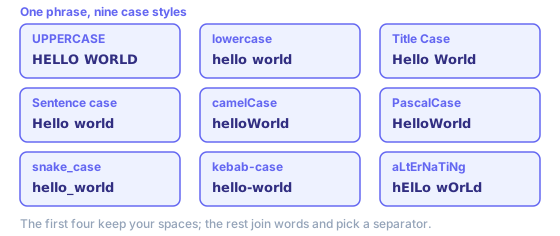
- UPPERCASE
- Shouting, legal headers, spreadsheet keys that must match exactly. Hard to read in long runs, so keep it short.
- lowercase
- Normalising data before comparing it. Two records only match reliably once both sides are lowercase.
- Title Case
- Headlines, product names, button labels. This converter capitalises every word — a deterministic rule, not an AP one.
- Sentence case
- Body copy, UI microcopy, error messages. Most modern style guides prefer it for anything longer than a few words.
- camelCase
- Variables and functions in JavaScript, Java, Swift. First word stays lowercase so the identifier reads as one token.
- PascalCase
- Classes, types, React components, C# methods. Also called UpperCamelCase.
- snake_case
- Python and Ruby identifiers, SQL columns, JSON keys in Python-flavoured APIs.
- kebab-case
- URLs and slugs, CSS class names, HTML attributes, npm package names. Hyphens survive link underlines; underscores hide under them.
- aLtErNaTiNg
- The mocking-tone meme, or a quick way to make a test string obvious in a log.
Which case does your language actually want?
These are conventions rather than rules — code compiles either way — but linters enforce them and reviewers notice. Python and Ruby take snake_case for variables and functions, PascalCase for classes. JavaScript, Java, Swift take camelCase for variables, PascalCase for classes and React components. Go uses PascalCase to mark an identifier as exported from its package, camelCase to keep it private, so there case is not cosmetic at all — it changes what your code does.
Outside code it is cleaner. CSS class names, URL slugs, npm packages, HTML attributes take kebab-case, because a hyphen survives a link underline where an underscore does not. Environment variables take SCREAMING_SNAKE_CASE. SQL columns are conventionally snake_case, since many databases fold unquoted identifiers to one case anyway, leaving a mixed-case column quoted forever. The awkward seam is JSON between a Python backend and a JavaScript frontend — pick one convention for the wire format, convert at that boundary rather than in three places.
Converting a slug is a slightly different job, because it also has to strip accents and punctuation. The slug generator handles that end to end, and the word counter is the quickest way to check a headline still fits after you switch it to Title Case.
Title case rules: which words stay lowercase
Every style guide agrees on the shape: capitalise the first word, the last word, and all the important words in between. Articles (a, an, the), coordinating conjunctions (and, but, or, nor, for) and short prepositions stay lowercase in the middle. So the is capitalised in a title only when it lands first or last — The Lord of the Rings, not The Lord Of The Rings.
Where guides disagree is prepositions. Chicago lowercases every preposition however long it is, so it writes Walking through Fire. AP capitalises any word of four letters or more, including prepositions, so it writes Walking Through Fire. APA follows the four-letter line too, lowercasing minor words of three letters or fewer — though APA switches to sentence case for titles in a reference list, which trips people up. MLA lowercases articles, prepositions and conjunctions at any length, close to Chicago.
This case converter does not implement any of those, deliberately: it capitalises every word, which is predictable and scriptable. For a headline, convert first and then lowercase the handful of short words by hand — there are rarely more than two or three, and you keep control over the ones a rule would get wrong.
Title Case or Sentence case for headings?
Title Case capitalises the words; Sentence case capitalises the sentence. Both are correct, and the only wrong answer is using each of them somewhere on the same page. Pick one, write it into the style guide, and run everything through the same case converter so it stays consistent.
Sentence case has been winning in product interfaces for a decade. Google, Apple, Microsoft, GOV.UK all specify it for headings, buttons, labels: faster to scan, translates without rework, and it does not turn a long heading into a row of shouted nouns. Title Case still holds for editorial headlines, book and film titles, press releases. Picking today: Sentence case inside an app, Title Case for anything that behaves like a headline. Converting existing copy? Go to Sentence case, then re-capitalise proper nouns by hand.
Three things this case converter cannot guess
Case conversion is a character rule, not a reading of the text, so meaning that lives in the capitals gets lost. These three come up constantly:
- Acronyms get flattened
- NASA launched a probe becomes Nasa Launched A Probe in Title Case, Nasa launched a probe in Sentence case. Nothing marks NASA as an acronym, so it is treated as an ordinary word. Fix those by hand afterwards.
- Sentence case stops at the first sentence
- hello. world again. becomes Hello. world again. — this rule capitalises one character, at the very start, not every character after a full stop.
- Punctuation rides along
- it's a test becomes it'sATest in camelCase, because only spaces, underscores and hyphens count as word breaks. Strip apostrophes and commas first if the result has to be a valid identifier.
Why a case converter beats retyping, and where case actually matters
Retyping a line in a different case is not hard, just slow and error-prone, and the errors are the quiet kind: one word left capitalised in a list of forty, an underscore where the rest of the file uses hyphens. A case converter is worth reaching for when the text is long enough that you would skim your own proofreading, or when the output has to match something else character for character.
Case matters more than it looks in three places. Identifiers in most languages are case-sensitive, so userId and userid are two different things and only one of them exists. URLs are case-sensitive after the domain on most servers, which is why slugs are kept lowercase by convention rather than by taste. And string comparison is case-sensitive everywhere unless you make it otherwise, which is why normalising both sides to lowercase before comparing is the standard fix for records that should match and stubbornly do not.
Where it matters less than people fear is in the text your readers see. No search engine ranks a page differently for a heading in Title Case rather than Sentence case. Consistency is the whole argument there: pick one convention, apply it site-wide, and the pages stop looking like five people wrote them.
One limit worth keeping in mind: case conversion is a per-character operation, so it cannot know that NASA is an acronym or that von in a surname stays lowercase. It is also language-sensitive — Turkish has a dotted and a dotless i that uppercase differently from English. Neither will trouble English prose; for user-supplied names, convert with care.
Worked examples
Sentence case   “HELLO THERE. how are you? fine!” → “Hello there. How are you? Fine!”
camelCase       “XMLHttpRequest”  → “xmlHttpRequest”
snake_case      “Hello, world!”   → “hello_world”
PascalCase      “get user ID”     → “GetUserId”
kebab-case      “Crème brûlée recipe” → “crème-brûlée-recipe”
Identifier styles split words at spaces, punctuation, underscores and hyphens, at lower-to-upper case changes, and at the end of an acronym, so XMLHttpRequest becomes three words. Accented and non-Latin letters are kept; strip them with the slug generator if you need ASCII-only identifiers.
Choosing an identifier style
Follow the language or platform convention rather than personal taste: camelCase for JavaScript variables and JSON fields, PascalCase for classes and React components, snake_case for Python, Ruby and most SQL column names, kebab-case for URLs, CSS classes and file names, and UPPER_SNAKE_CASE for constants and environment variables.
Related tools
These free tools pair well with this page — open them in a new tab to finish your workflow.
자주 묻는 질문
어떤 텍스트 형식을 지원하나요?
UPPERCASE, lowercase, Title Case, Sentence case, camelCase, PascalCase, snake_case, kebab-case, CONSTANT_CASE를 지원합니다. 각 형식은 프로그래밍이나 글쓰기의 다양한 상황에서 사용됩니다.
camelCase와 PascalCase의 차이점은 무엇인가요?
camelCase는 첫 단어가 소문자이고 이후 단어의 첫 글자가 대문자입니다(예: myVariableName). PascalCase는 모든 단어의 첫 글자가 대문자입니다(예: MyClassName). PascalCase는 클래스 이름에, camelCase는 변수·함수 이름에 주로 사용됩니다.
snake_case는 어디에 사용되나요?
snake_case는 소문자 단어를 밑줄로 구분합니다(예: my_variable_name). Python, Ruby, 데이터베이스 컬럼 이름에서 널리 사용되며 복합어 식별자의 가독성을 높입니다.
kebab-case란 무엇인가요?
kebab-case는 하이픈으로 소문자 단어를 구분합니다(예: my-variable-name). URL, CSS 클래스 이름, HTML 속성, 웹 프로젝트 파일 이름에서 주로 사용됩니다.
Title Case는 모든 단어를 대문자로 시작하나요?
Title Case는 모든 단어의 첫 글자를 대문자로 만듭니다. AP, Chicago 스타일 가이드에서는 짧은 전치사나 접속사를 소문자로 유지하기도 하지만, 이 도구는 모든 단어를 대문자로 시작하는 간단한 방식을 사용합니다.
변환은 되돌릴 수 있나요?
일부 변환은 정보를 잃습니다. 예를 들어 'myVariable'→snake_case→'my_variable'→camelCase→'myVariable'은 복원되지만, 'MY_CONSTANT'를 소문자로 변환하면 상수 의미가 사라집니다. 항상 원본 텍스트를 보관하세요.